Timing tools for every investor

For day traders and long term investors.

Capabilities

Ad freeNo ads EVER.
Get in Sync With The MarketsGet a medium term roadmap for when big moves and pivots are likely to happen.
Find Hidden LevelsUncover hidden support/resistance lines based on the locations of the planets.
Identify CyclesFind the active cycles that are driving price moves.
Know When Markets Could PivotSee the correlation between changes in planetary speed and the markets.
See a Roadmap of PriceView a forecast roadmap of prices based on price from 10, 20 and 60 years prior.
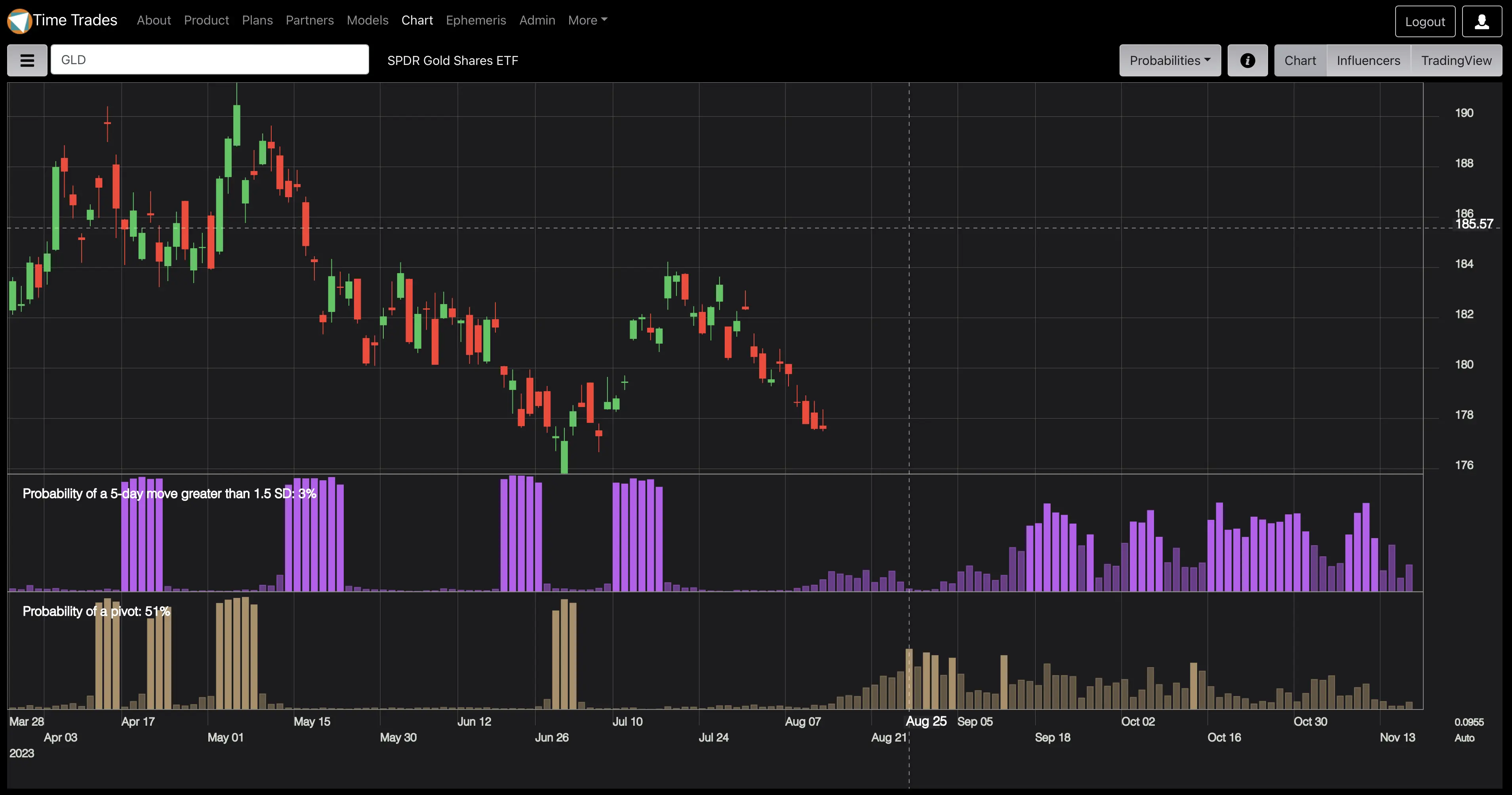
AI ForecastsDisplays a forecast of probabilities of a price pivot and 1.5 standard deviation moves. Updated daily.
Easy Chart SquaringEasily square a chart to benefit from Gann Fans.
Deep TradingView IntegrationIncludes access to 18 invite-only TradingView scripts for timing and levels. Covers both position trading and intraday trading.
Scan for the Best OpportunitiesQuickly filter all 800+ symbols to find those with the greatest probability of a pivot or a big move.
Weekly Analysis VideoSee how I combine tools and techniques to create a weekly forecast.
Learn What Influences the MarketLearn the cycles behind the markets as the influencers feature exposes what the AI engine learns about pivots and big moves.
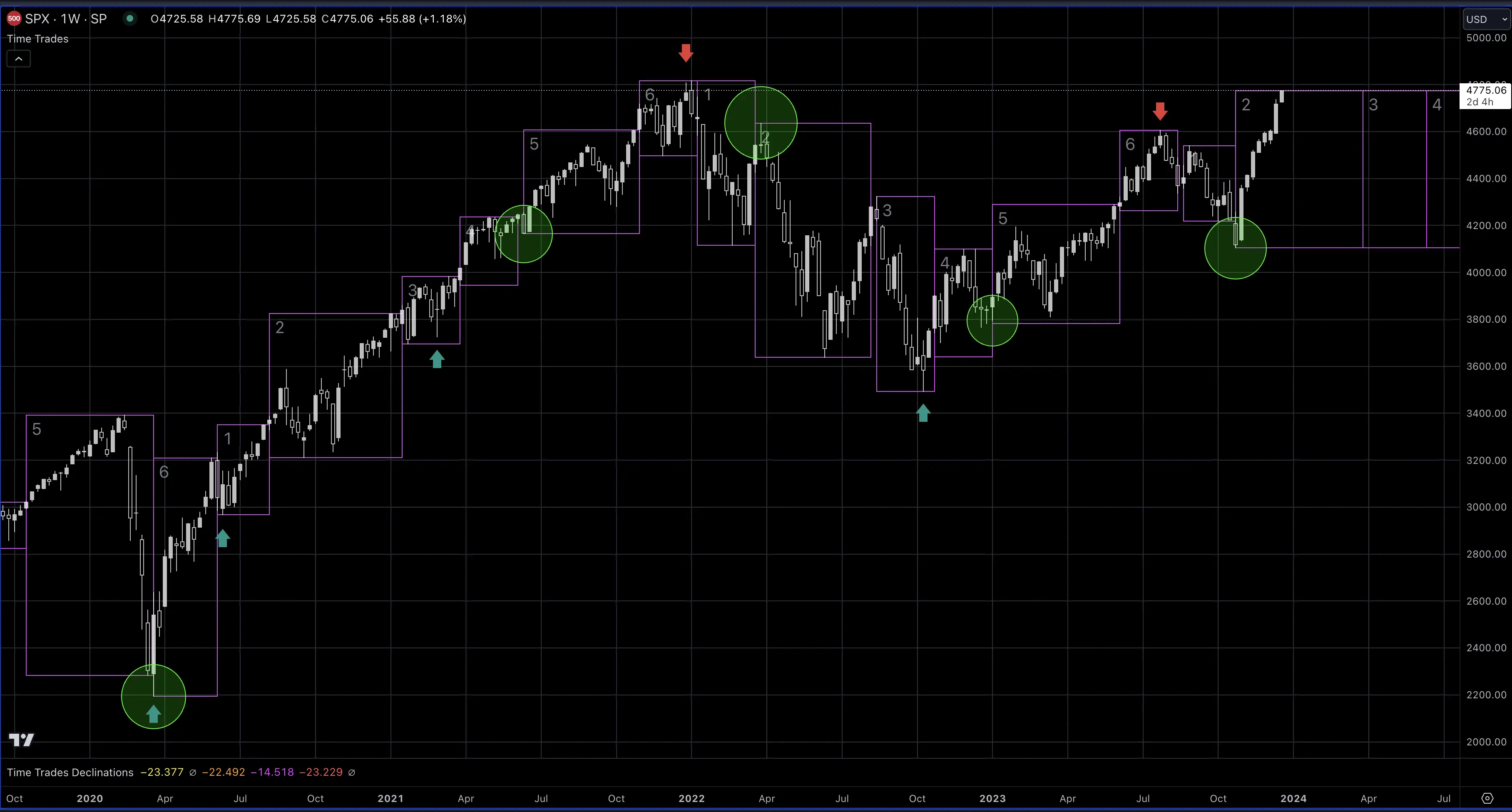
Display intervals of the Venus Earth synodic cycle on TradingView charts

Get in Sync With The Markets

Identify times when prices are likely to trend, and times when prices are likely to consolidate and pivot.

Intervals 2 and 5 are typically large, strong trends, while intervals 1, 3, 4, and 6 tend to be choppier and more likely to reverse.

The transitions at the start and end an interval 2 or 5 often results in a major pivot.

Dynamically switch your strategy from a trend following strategy to a reversal strategy.
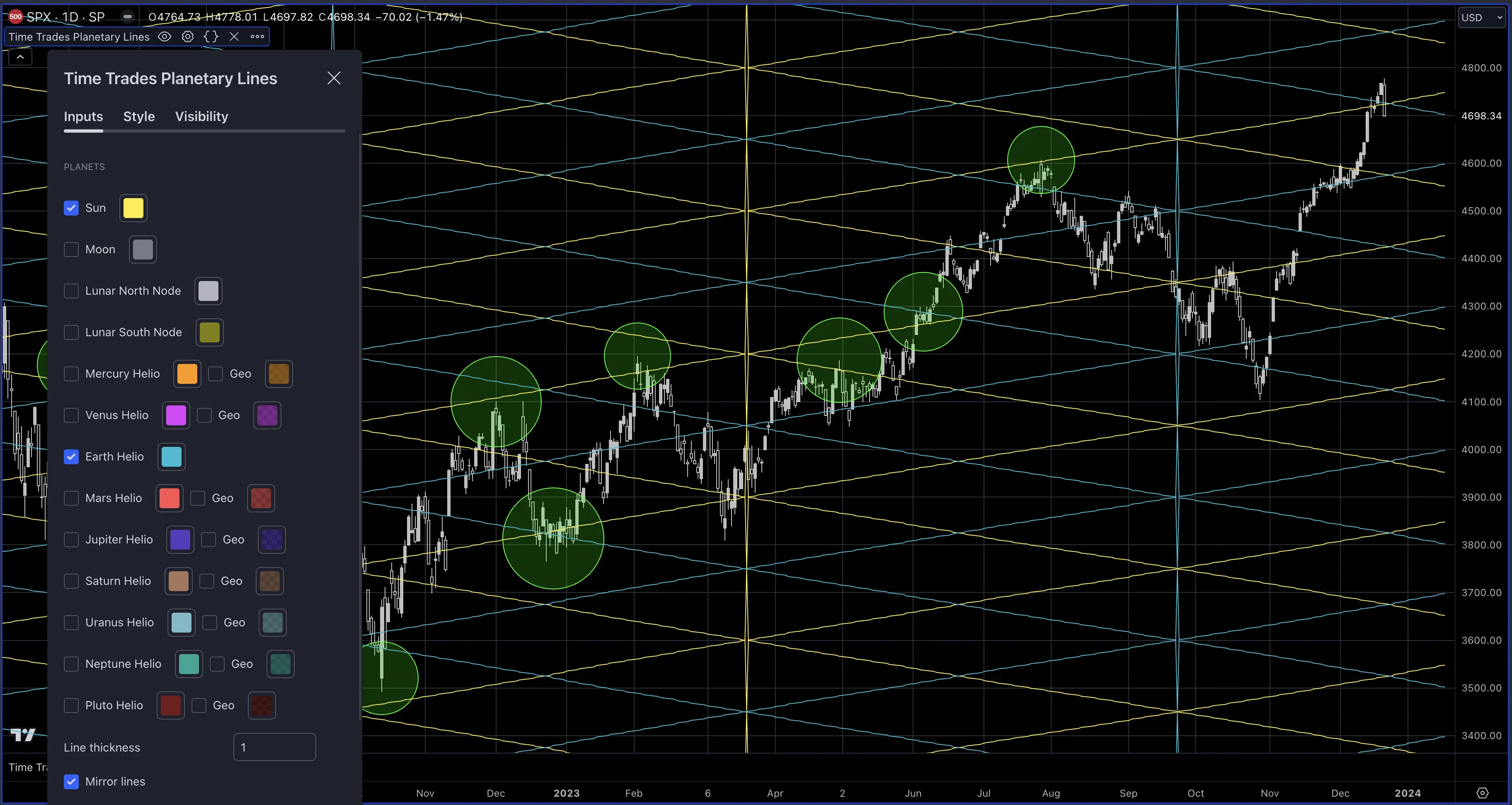
Display hidden support and resistance lines based on planetary locations

Find Hidden Levels

Uncover hidden support and resistance levels by converting planet locations to price.

Supports the Sun, Moon, and all planets both geocentric and heliocentric. Also includes the lunar nodes.

You can see how the Sun and Earth lines provide reliable support and resistance levels.
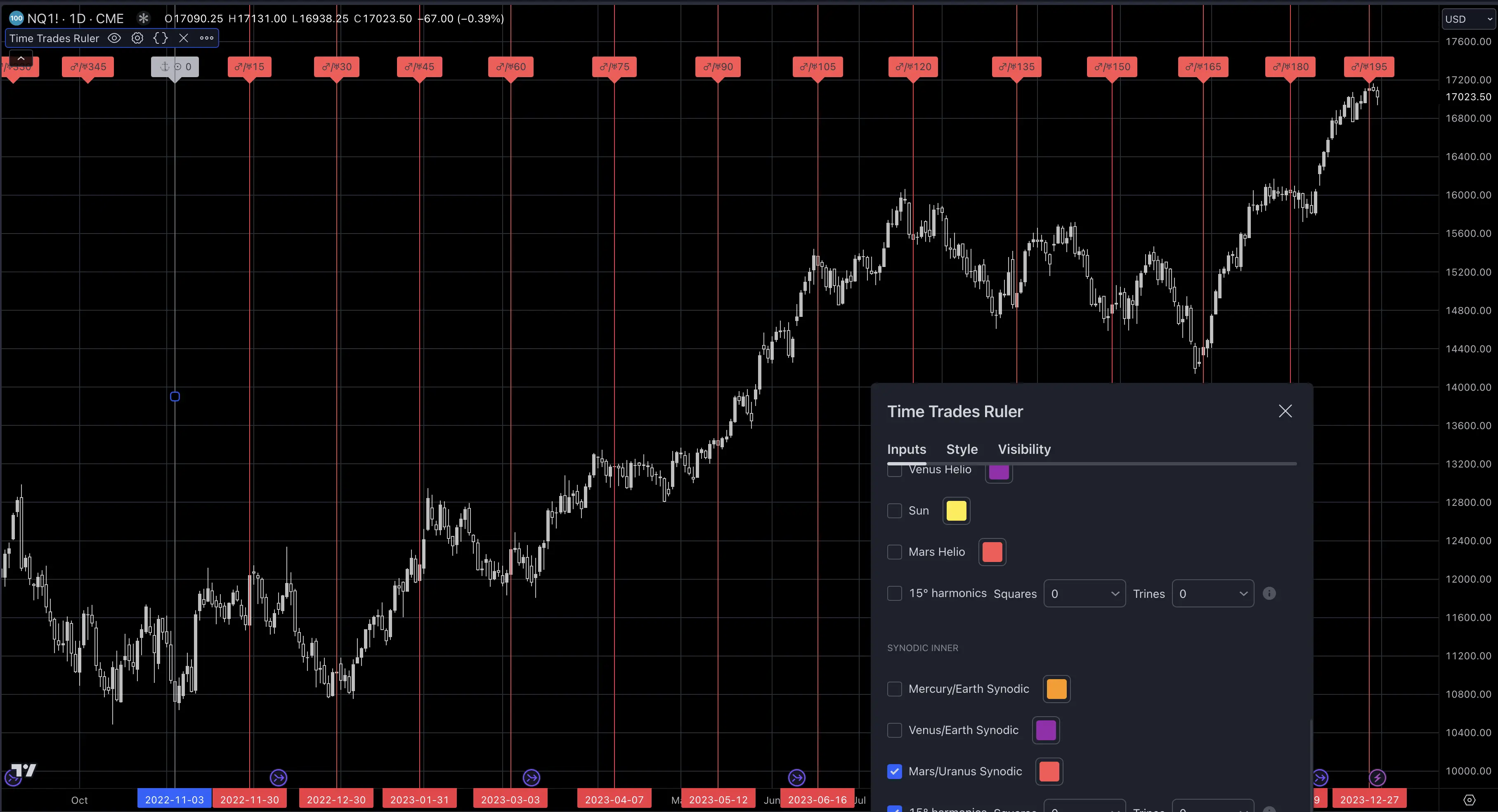
Find active cycles within a price trend

Identify Cycles

Choose from among 12 possible cycles to see which are active in the asset you're trading.
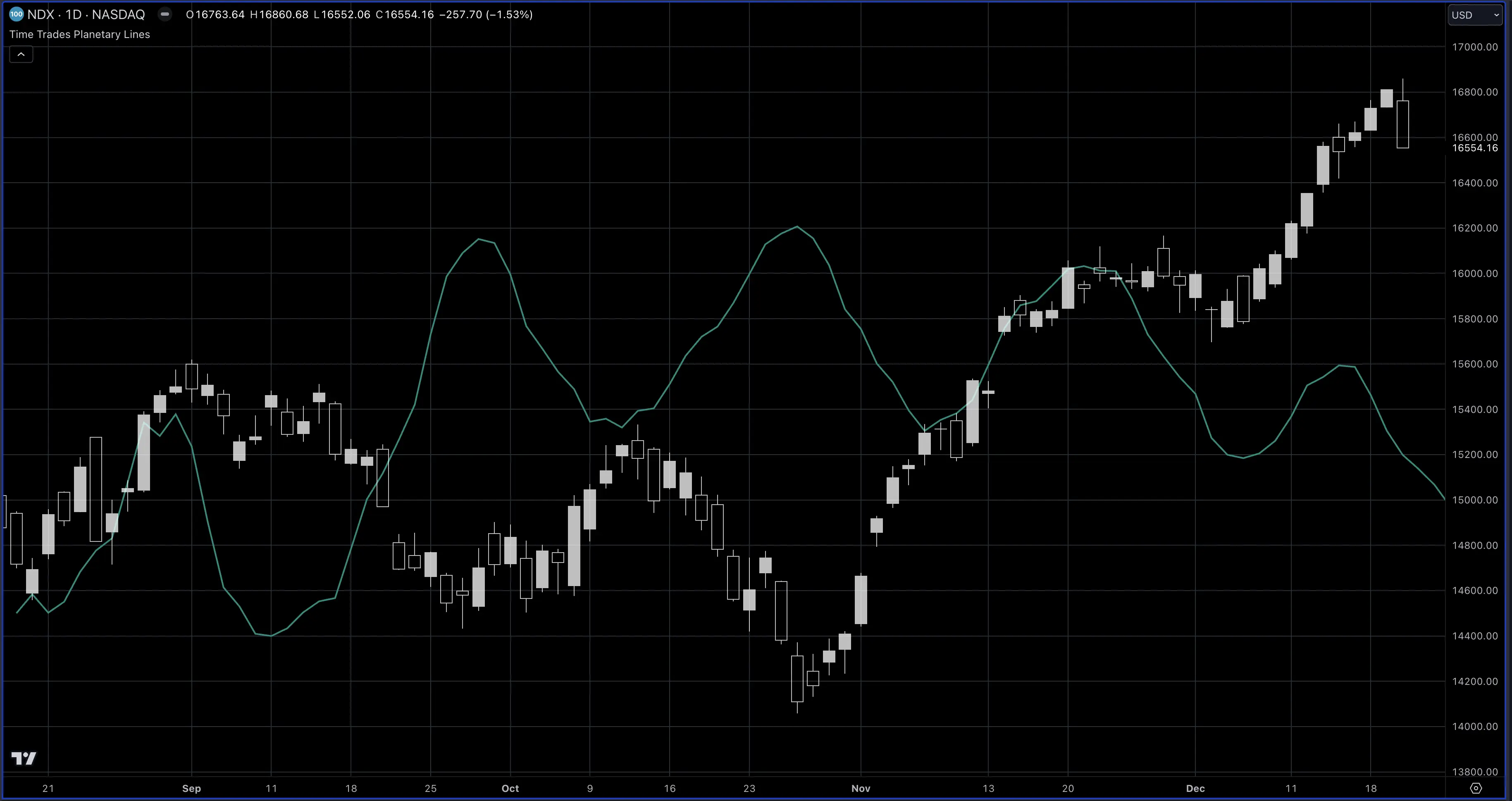
The speed index indicator shows speed fluctuations of planets in the solar system.

Know When Markets Could Pivot

The speed index indicator shows speed fluctuations of planets in the solar system.

See for yourself how pivots in the speed index align with pivots in price.

The speed index is an option of the Planetary Lines script.
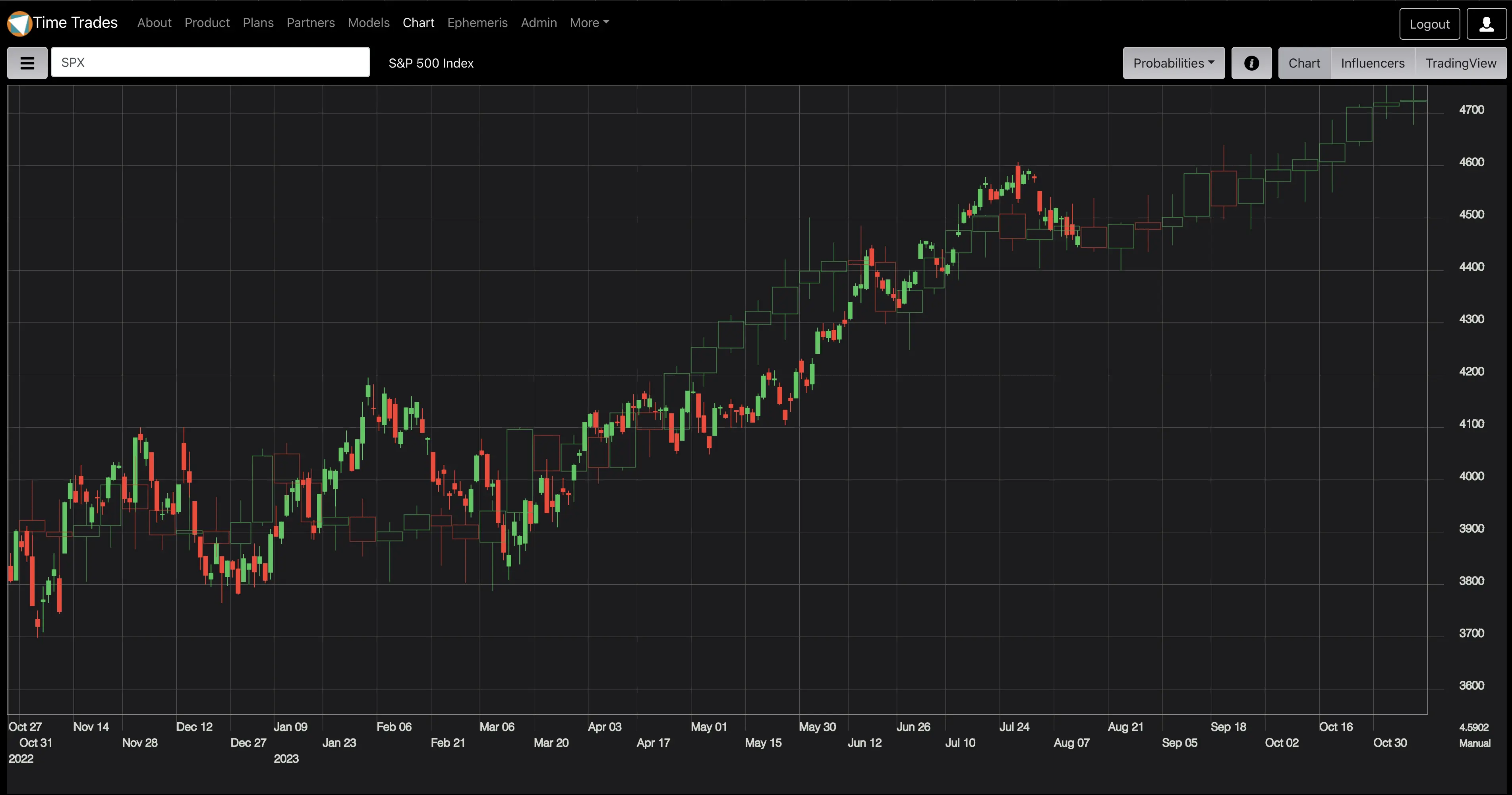
Gann Mass Pressure Index

Visualize a Roadmap of Price

See a composite of prices from 10, 20, and 60 years prior, displayed as a weekly candle. WD Gann used a technique similar to this for his annual forecasts.

  • Includes full candle data - open, high low and close.
  • 52 weeks of future candles for yearly subscribers.
  • 6 weeks of future candles for monthly subscribers.
  • Overlaid on past price so you can review the correlation.
  • Unlike a PDF, you can clearly see the date and trend implied by the candles as you move your mouse.
  • Available for SPX and DJI.
AI stock and crypto market forecast

View AI Forecasts

Time Trades includes Artificial Intelligence (AI) that computes and displays the probability of a pivot and the probability of a move in any direction.

  • No directional bias eliminates the risk of inversion.
  • Helps pinpoint the optimal times to buy options, and when to write options.
  • Let the market elect the direction of the trade.
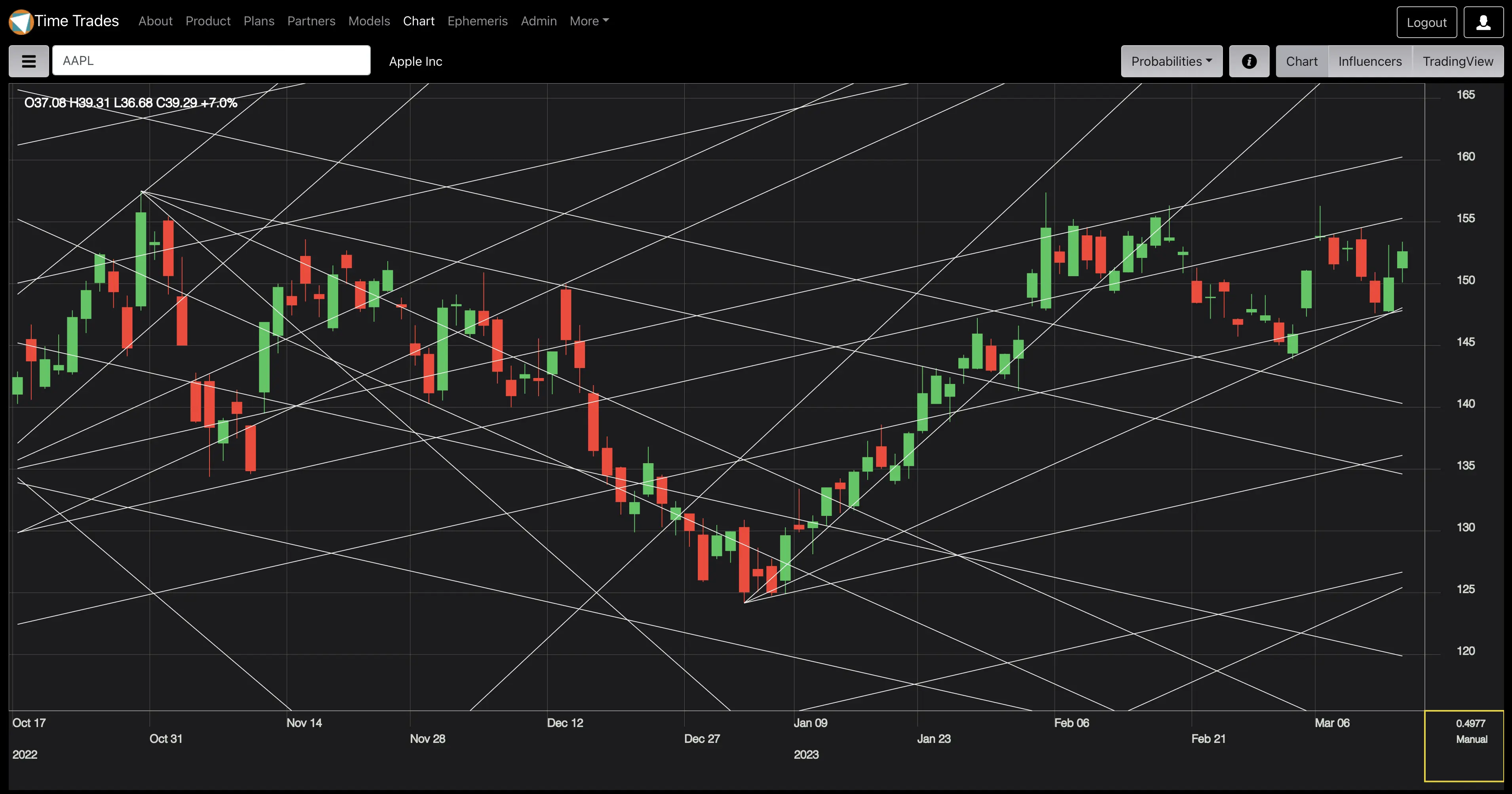
Gann Fan to Square a Chart

Square a Chart With Ease

If you have worked with Gann techniques before you know the first thing to do is to 'square' the chart.

This means you need to establish the aspect ratio between time and price.

Doing this manually requires drawing many trendlines from pivot points and then making manual adjustments.

Time Trades automatically draws Gann Fans from major pivots, so all you need to do to square the chart is drag the price axis up and down to get the best fit.

The resulting price to bar ratio can be used directly in TradingView for further analysis.
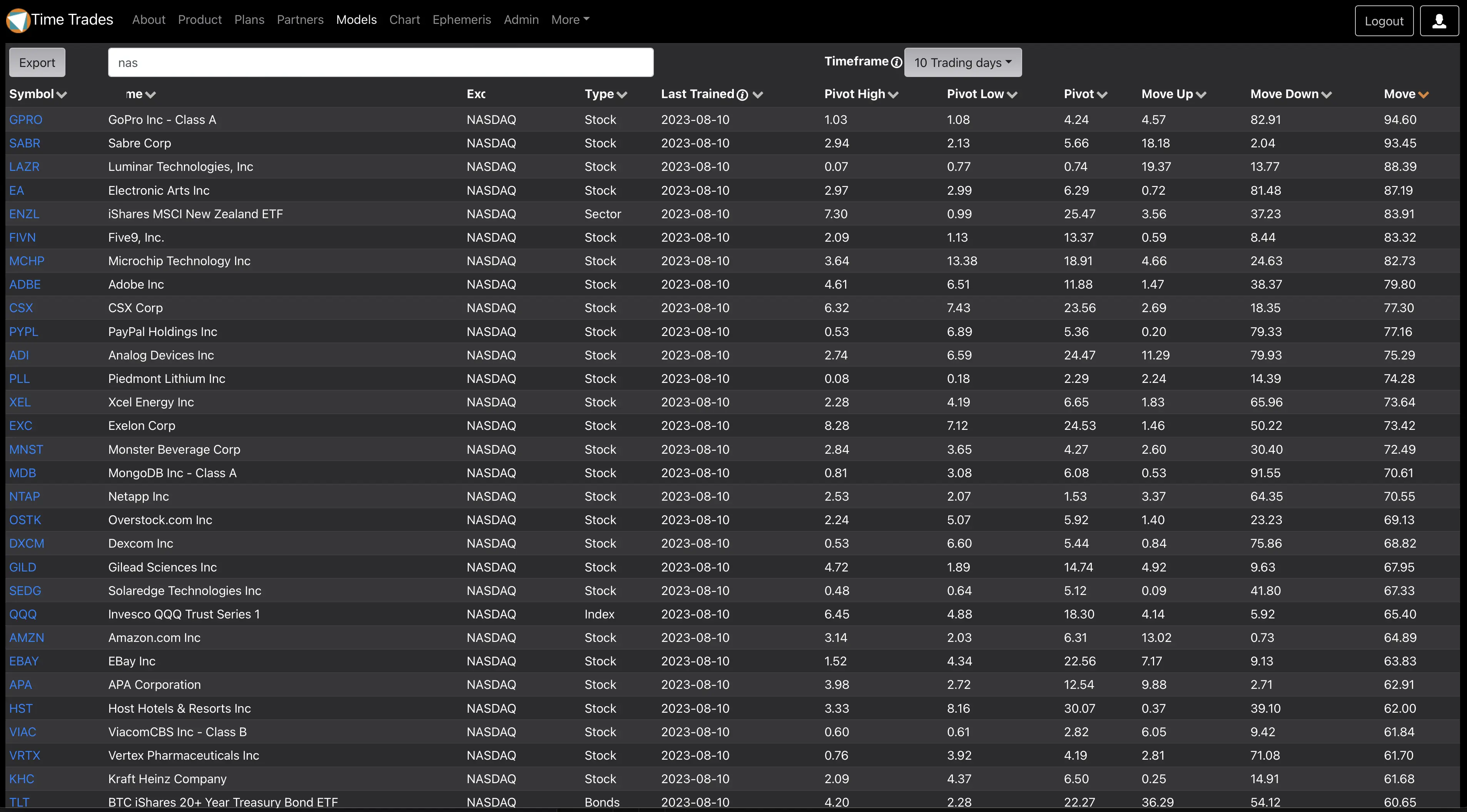
Scanner Finds Potential Big Moves

Scan for the Best Opportunities

Quickly find the best trading opportunities among hundreds of stocks and coins.

With over 800 symbols in Time Trades, you don't have to look through them one-by-one to find a high probability trade.

The screenshot shows how the Models tab allows you to find all Nasdaq stocks with the highest probability of a move in the next 10 trading days.

This is ideal as a first pass screener to find the stocks, coins, or currency pairs worth a more detailed analysis.
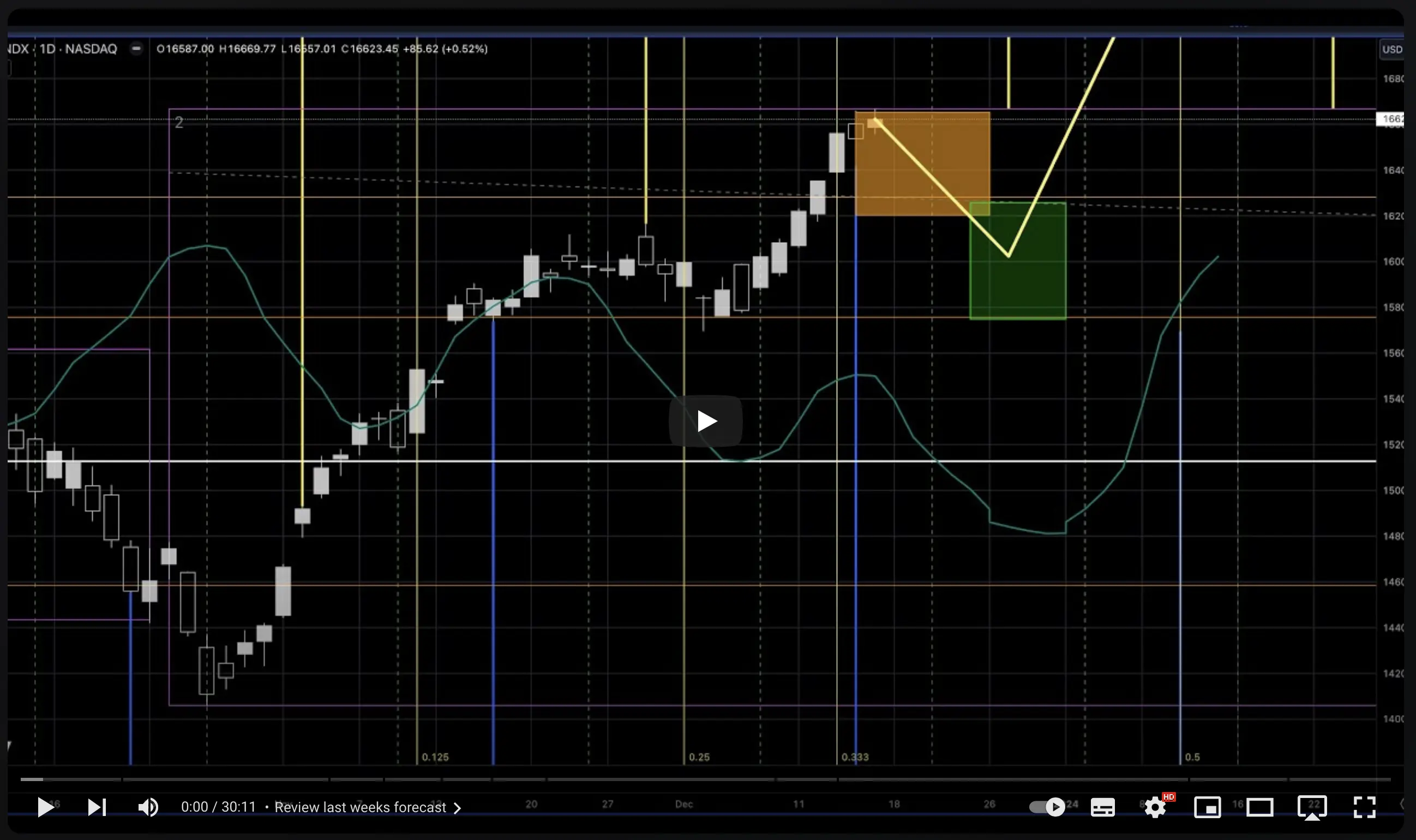
Weekly analysis video

Weekly Analysis Video

Every week I record a 20-30 minute video reviewing stock indices, the dollar, crypto and gold.

I use the Time Trades tools and sometimes my own personal research to update forecasts and review the success of past forecasts.
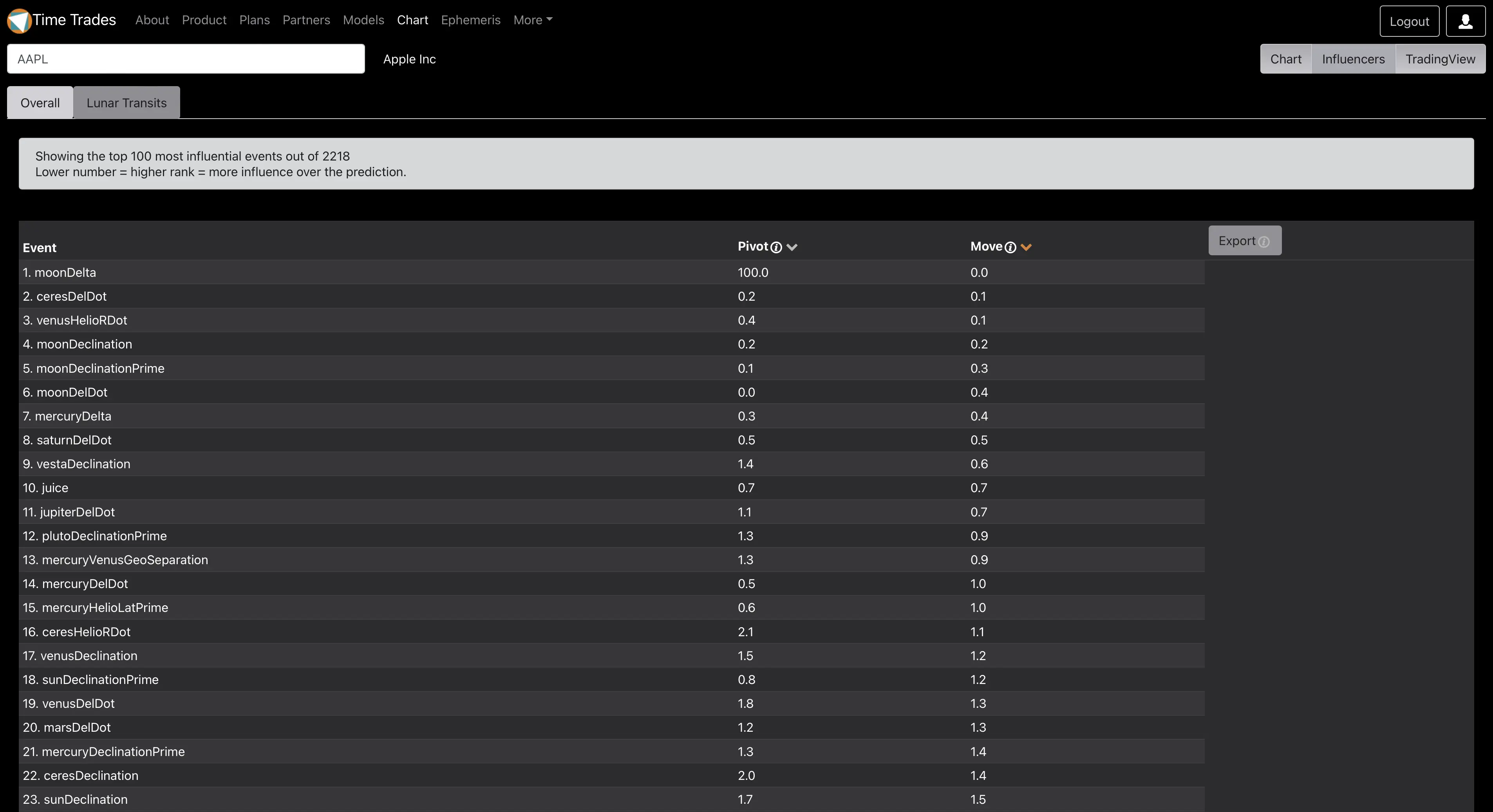
Identify the astrology aspects with the most influence over pivots and 1.5 standard deviation price moves.

Identify Key Influencers

Time Trades isn't a black box. It exposes what it learns so you can see the most influential timing events.

This screen shot shows that distance to the Moon (moonDelta) is is the #1 influencer over 2 standard deviation moves in any direction in AAPL.

You don't have to know astrology to get value from Time Trades. It distills all the astrological events down to clear probabilities.

Getting Started

Here are some resources to help ensure your success.

User Guide

A 60+ page guide covering the features of Time Trades and trading techniques using these features.

YouTube Channel

2 playlists cover:

  • Details on how to use Time Trades web application.
  • Weekly analysis video shows how to use Time Trades in your own analysis.

TradingView Scripts

Get access to the Time Trades TradingView scripts by entering your TradingView user name in the Time Trades user profile.

18 scripts are included in both trial and paid subscriptions

See the User Guide page for a full description

Community

Join our Telegram group to get insights from other Time Traders.

Available to trial and paid subscribers.

TradingView Historical Scripts

Only included with paid subscriptions, get the TradingView script for key time periods like 1929, 1974, 1987, and 2017. Ideal to research how these indicators performed during these important time periods.

Paid subscribers automatically receive access.

Frequently Asked Questions

What is Time Trades? +

Time Trades is a data service designed to add clear timing forecasts to your existing price analysis.

It can be used in a number of different ways:

  • Identify patterns of price behavior, and when it changes
  • Find the astrological events with the most influence over price
  • View forecasts of price behavior based on machine learning models
  • Scan 900+ models quickly to find those with the most forecast activity for the coming days

Most traders already have a method to analyze price.

Time Trades focuses on analyzing time.

Instead of learning complex topics like Gann techniques or Astrology, Time Trades simplifies time forecasts to easy-to-understand probabilities.

How are the forecasts generated? +

Every night, 20+ years of daily price data is analyzed to identify 6 different 'behaviors' (or labels for those of you that understand machine learning). These behaviors are:

  • Pivot highs
  • Pivot lows
  • 2 standard deviation up moves
  • 2 standard deviation down moves
  • Non-directional pivots
  • Non-directional moves

Once these 6 behaviors are identified, 6 separate machine learning models are trained, one for each behavior.

What are the risks inherent in these models? +

These models, while very performant, will never be perfect:

  • They are trained on a maximum of 20 years of price data, so longer cycles driven by slow outer planets will not be picked up.
  • Stocks with less price history will miss out on more cycles than stocks with more history.
  • The models do not detect inversions. Sometimes the predictions will invert where a given cycle may switch from a pivot low to a pivot high.
  • Astrological aspects are based on a daily snapshot at 0:00 UTC each day. Influential aspects may happen prior to markets opening or after markets close.

For these reasons, we surface additional visualizations so that you can use your own neural network (your brain) to analyze the forecast.

These additional visualizations include the Cheat Code, Gann Waves, Short Term Waves and Gann Fans.

Why do the forecasts change? +

Future forecasts can and will change from day to day, just like our own personal outlook for the market changes.

Most of the time these changes are minimal. You won't tend to see wild swings from a pivot high next Tuesday to a pivot low.

When the forecasts do change noticeably compared with the prior day. There's a few reasons for this:

As future forecasts transition into the past, the probabilities will change as the system will fit the forecast to align with actual price behavior. This is normal and expected.

  • A new price pivot was identified in the price history. Many timing counts are anchored to price pivots, so when these change or move, the forecast will change.
  • The prior days move is a big move up or down and influenced the models predictions.
  • A new pivot was detected in the price history which changes the future forecasts.
  • We are always researching and testing new ways to improve the predictions. We may have added new data points to the model after proving that it has a positive impact on model performance.

To give you a sense of how much variance to expect, see the section called 'Variance' in the Time Trades User Guide

Why do the forecasts for historical data look so perfect? +

The predictive model is trained on historical price data, up to the prior trading day, and has created a model that aligns to past prices. Historical forecasts will therefore be a very close match to prices.

It's very important that you do not assume historical model performance will continue into the future!

I'm familiar with traditional programming but I just don't get this machine learning stuff. +

Think of it this way: traditional programming takes data, and rules written by the programmer to generate answers. Machine learning takes data and answers, and generates rules. These rules are then applied to the future to generated predictions. Training a model is the process of generating rules based on the answers (historical price data).

I have not written any code that says "Saturn is bad" or "Jupiter is good". All the rules generated by the machine learning model are inferred from the actual price behavior

How does Time Trades integrate with TradingView? +

If you use TradingView, you can provide your TradingView username. Within 12 hours we will grant you access to an invite only script.

This script includes the Gann Waves feature and an indicator that we call Cheat Code.

This script is part of your Time Trades subscription or trial, and access will end when your subscription or trial ends.

Can I trade based on Time Trades probabilities alone? +

You're free to trade as you wish, but for best results, we don't recommend trading based on the probability forecasts alone.

We recommend combining the forecast probabilities with your existing price analysis and risk management methods. Time Trades is not a silver bullet. You will still need to have good trading execution and risk management.

To put it another way, don't YOLO out of the money 0 DTE puts because Time Trades says there's a 51% probability of an down day.

I cancelled my subscription. Can I get a refund for the unused portion? +

In general, we do not offer refunds. You will continue to have access for the duration of your subscription term. If you believe your situation warrants an exception, email support@time-trades.com.

How do I upgrade from a monthly subscription to a yearly subscription? +

You can save 25% by upgrading to a yearly subscription term. Purchasing a yearly subscription if you already have a monthly will result in two active subscriptions. For this reason, please purchase your yearly subscription as close to the end of the monthly subscription as possible. After purchasing your yearly subscription, you can use the Billing Portal under the User Profile to cancel your monthly subscription. Contact support@time-trades.com with any questions.

Why is there a limited set of symbols? +

Behind the scenes, Time Trades creates and generates a machine learning model for each symbol in the system.

In order for the model to have predictive value, it must have at least 3 years of price history.

In addition, the overnight training process takes many hours and we want it to finish before the market opens.

How can I request additional symbols? +

If you'd like to request a new stock or crypto currency, email support@time-trades.com. Please ensure there's at least 3 years of data for the symbol you're requesting.

We will do our best to accomodate your request

We are constrained by what's available from our data providers. For example we don't have access to index data like SPX, but that can easily be worked around by using SPY.

Our data provider currently supports the following indexes: Most American stocks on the Nasdaq and NYSE, London, Toronto, Toronto Venture, Germany XETRA, Germany Frankfurt, Euronext Paris, Euronext Amsterdam, Euronext Lisbon, Euronext Brussels, India BSE and Brazil São Paulo.

How can I get help?

Email support at time-trades.com

DM @timetrades1 on Twitter

We welcome your feedback

We're always interested in your ideas on how to improve the service. Let us know your thoughts!